


Lock-in is priced at renewal, not at signing
Nobody signs an integration contract expecting to be trapped. The demo went well, the HL7 and FHIR boxes were ticked, and the price per interface looked fair. Lock-in shows up years later, when the contract is close to ending and someone asks what it would take to leave.
Picture that meeting. Procurement wants options. The Head of Digital wants to consolidate onto a shared ICS platform. The IG Lead wants to know where six years of message history will go. IT asks the incumbent for an export of the ADT, results and ESR feeds, and gets back screenshots, a PDF of interface specifications and a quote for migration support. Two of the feeds were built by a contractor who left years ago.
Nobody in that room did anything wrong. But the Trust's position at renewal is now set by its switching cost, and the supplier can see that number more clearly than the Trust can. That is how vendor lock-in in healthcare integration works: built quietly during delivery, priced at renewal.
The four layers where lock-in lives
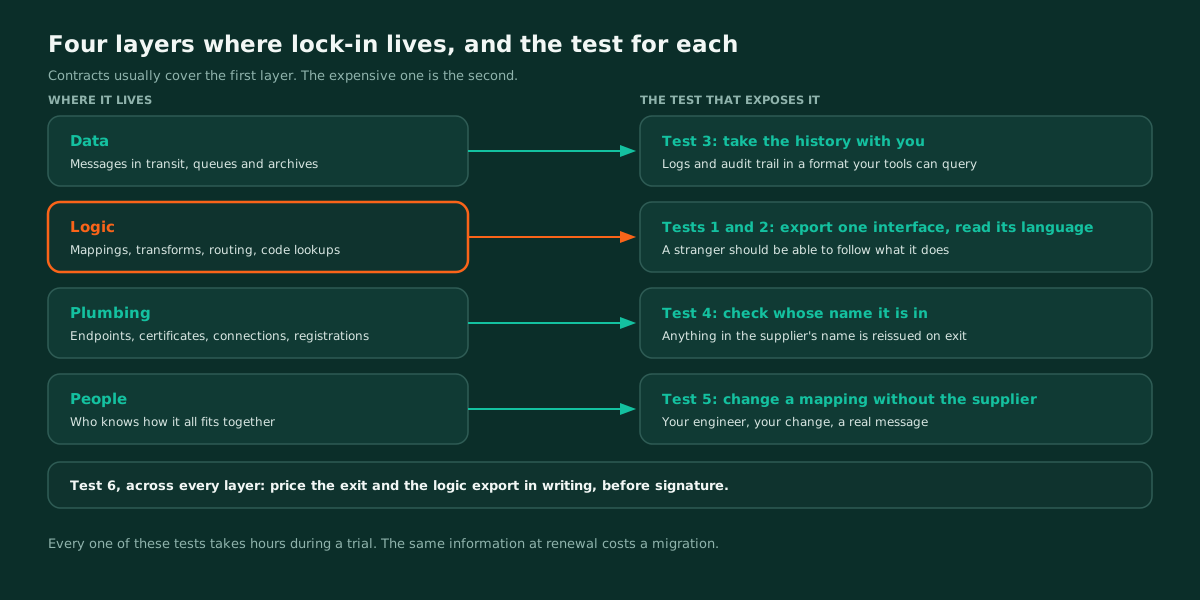
Lock-in builds up in four layers. Contracts usually address only the first.
| Layer | What it covers | What lock-in looks like | What it costs on exit |
|---|---|---|---|
| Data | Messages in transit, queues and archives | Returned in a format you can't load or query | Records you hold but can't use |
| Logic | Mappings, transforms, routing, code lookups, error handling | Stored in a format or scripting language only one engine can read | Every interface rebuilt from specifications |
| Plumbing | Endpoints, certificates, network connections, client registrations | Registered in the supplier's name | Reissued, and every connected system repointed |
| People | Knowledge of how it all fits together | Every change routed through a supplier ticket | The knowledge leaves with the contract |
Data is the layer contracts cover, because UK GDPR Article 28 already requires a processor to delete or return personal data at the end of the service, at the controller's choice. That obligation says nothing about format or completeness, and it says nothing at all about the logic.
Logic is where the expensive knowledge lives: the PAS quirk that needs a Z segment stripped, the local code map behind a pathology feed, the routing rule someone added after an incident. If it can't leave in a readable form, you can't take it with you. You can only rebuild it, which is the slowest part of every migration, as decommissioning a legacy interface engine sets out.
Why standards support proves nothing about portability
Every supplier on a shortlist will support HL7 v2 and FHIR R4. That tells you what goes in and what comes out. It tells you nothing about what happens in the middle.
A platform can take HL7 v2 in, send FHIR R4 out and keep every transformation step in a format only its own tools can open. Standards at the edges, proprietary at the core. It is the most common shape of proprietary integration platform risk, and it passes every interoperability question in a tender.
The useful question is not which standards a platform supports. It is: if we leave, in what form does the logic leave with us? The six tests below answer it before signature, while you still have leverage.
Test 1: Export one real interface during the trial
Pick one interface from the evaluation that does real work, ideally with a mapping, a code lookup and a branch. Ask for a complete export: mappings, transforms, routing rules, schemas and lookups.
Then give the export to an engineer who has never used the product. If they can follow what it does, the logic is portable in the way that matters. If the export is screenshots, a PDF, or a file only the supplier's tool can open, you have found the lock-in, and you found it in an afternoon.
Test 2: Read the language the transforms are written in
Ask what the transformation logic is actually written in. An open, documented language such as XSLT, JSONata or the FHIR Mapping Language can be read, versioned in your own repository and, with effort, run somewhere else. A proprietary scripting layer runs on one engine only.
Watch for the middle case too. A visual mapper can look portable on screen and still save to a closed format underneath. The canvas is not the artefact. The saved file is, so ask to see the saved file.
Test 3: Find out whether the history leaves with you
Message history and audit trails are records in their own right. Your IG Lead will have retention obligations for them that outlast any supplier contract.
Ask for the trial's message logs and audit trail in a format your own tools can query. Then ask three follow up questions in writing: how long the supplier keeps history after termination, how you retrieve it, and what retrieval costs. A platform that logs well but exports badly has only moved the problem.
Test 4: Check whose name is on the plumbing
List every endpoint, certificate, DNS record, network connection and client registration the integration will depend on. For each one, ask whose name it is registered in.
Anything in the supplier's name will have to be reissued on exit, and every connected system repointed at the new address. Where national services are involved, check whether any assurance or onboarding is tied to the supplier's product rather than to your organisation, because that work restarts with a new supplier. None of this is visible in a demo. All of it is visible on the day you leave.
Test 5: Have your own engineer change a mapping
During the trial, ask one of your own engineers to change a live mapping without supplier help. Not a demo by the supplier's solution engineer. Your person, your change, a real message through it.
Watch how long it takes and what they need to ask. That is the knowledge your team will hold on the day the contract ends. If every change routes through a supplier ticket during the trial, it will route through a supplier ticket for the life of the contract.
Test 6: Price the exit now
Ask for the cost of termination assistance and a full logic export, in writing, before signature. Ask how long each takes.
A supplier confident in its service doesn't need a high exit price to keep you. A vague answer is still an answer, and this is the cheapest due diligence in the whole procurement.
Write the exit into the contract, not the relationship
Most of this stays hidden because the exit is left to goodwill. Goodwill is reliable while the relationship is healthy, and gone at the moment you need it.
Put it in the contract before signing:
- The export format for logic as well as data, not just "return of data".
- A timeline and a capped cost for termination assistance.
- Ownership of endpoints, certificates and registrations from day one.
- Retrieval of message history and audit trails for the retention period your IG Lead sets, not the supplier's default.
None of this is hostile. A good supplier can agree to all of it in one meeting. The ones that can't are telling you how the renewal will go. If you are running a wider evaluation, our healthcare integration platform comparison covers how to structure it.
How WeHub approaches portability
We would rather be chosen than defaulted to, so portability is designed in rather than negotiated later.
In WeHub Studio, a workflow is one configured artefact, and the whole workflow exports as a file and imports elsewhere. That was built for moving between environments, and it is the same property Test 1 checks for. Workflows run on WeHub's environments or on your own infrastructure, depending on what your information governance requires.
WeHub Term exposes terminology through the standard FHIR terminology operations rather than a proprietary API, so the integrations that call it are not coupled to one implementation. Local and custom code systems are versioned under canonical URLs alongside the national releases, which is the part of an estate most often lost in a migration.
None of that is a reason to skip the tests. Put all six in your evaluation pack and run them against every shortlisted supplier, including us.