

Two kinds of product, one shortlist heading
The EPR has gone live, or is about to. The board wants adoption, the clinical leads want fewer workarounds, and someone is asked to find the platforms that work with the Trust's EPR. The search for digital adoption platforms and EPR integration returns two categories of product that do completely different jobs.
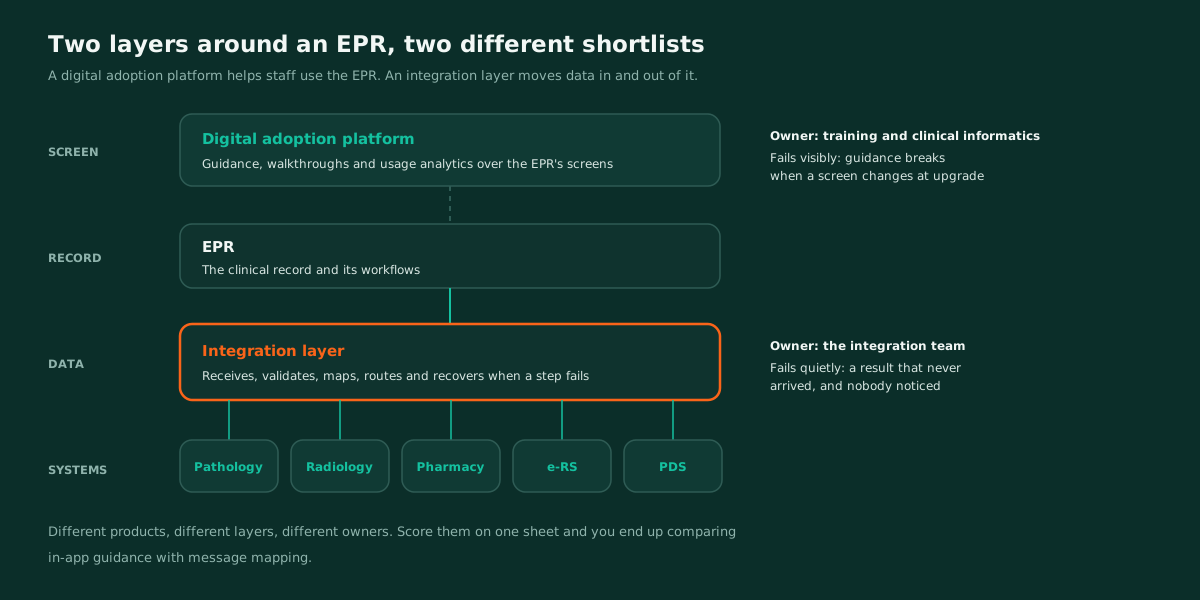
One helps staff use the EPR. The other moves data in and out of it. Both get described as EPR integration, both end up on one shortlist, and the evaluation sheet ends up comparing in-app guidance with message mapping.
Neither category is wrong to want. The mistake is treating them as alternatives. They sit at different layers, they answer to different owners, and they fail in different ways, so they need two shortlists with two sets of criteria.
What a digital adoption platform does, and what it doesn't
A digital adoption platform sits on the user interface. It overlays the EPR with walkthroughs, prompts, field level guidance and usage analytics, so a ward nurse meeting a new screen gets help in context rather than in a training room. Its connection to the EPR is mostly at the screen: it has to recognise pages and fields reliably, including after the EPR is upgraded.
What it doesn't do is move clinical data between systems. It won't take a pathology result into the EPR, process an ADT feed or check a SNOMED CT code before it lands. If a shortlist expects it to, the evaluation is scoring the wrong thing.
For that shortlist, three questions matter more than any feature list. How does the guidance survive an EPR upgrade that changes screens? What does the analytics capture, and does any of it include patient data from the screen? And who in the Trust owns the content once the supplier's onboarding team has gone? The second question belongs in your DPIA, not just your evaluation.
What the integration layer around an EPR has to do
The EPR is rarely the only system that matters. Pathology, radiology, pharmacy, e-RS referrals, PDS demographics, workforce feeds from ESR and departmental systems that predate the EPR all need data to move to and from it.
The integration layer does that work. It receives a message, validates it, maps it, enriches it, routes it, confirms delivery and recovers when a step fails. It is owned by the integration team, and it fails quietly: not as a broken screen someone reports, but as a result that never arrived and nobody noticed. The anatomy of a healthcare integration workflow walks through those steps from the inside.
Shortlist for capability, not for a connector name
Connector lists are the easiest thing to compare and the least useful. A named connector tells you that somebody, at some point, connected to that product. It tells you nothing about the version your Trust runs, the local configuration built on top of it, or what happens when the EPR supplier changes an interface at upgrade.
Shortlist the integration layer for capability instead:
- Standards in production, not on a datasheet. HL7 v2 in both directions, and FHIR R4 against UK Core profiles where the EPR exposes FHIR APIs. Ask which message types and resources each supplier has actually run in production.
- Testing before live. Can you send a real message shape through the whole flow and see every step's output before anything touches the EPR?
- Terminology checked in flight. Codes validated against governed value sets on the way in, not discovered wrong in a report months later. Terminology server vs lookup table sets out why.
- Failure handling you configure. Retry, back off, park and alert the owner. EPR downtime windows are planned events, so the layer should queue and resume, not drop.
- Observability per message. Where is this result now? It should be answerable without logging into four systems.
- Change without the supplier. After an EPR upgrade, your team should be able to edit a mapping without raising a change request against the integration supplier.
- Clinical safety evidence. The supplier's DCB 0129 position, and what it gives your clinical safety officer for the Trust's own DCB 0160 work.
- A tested exit. Can the mappings and routing leave in a form another engineer can read? Vendor lock-in in healthcare integration covers the tests.
Where shortlists go wrong
Four patterns come up again and again.
Scoring both categories on one sheet. A digital adoption platform will score badly on message handling and an integration platform will score badly on in-app guidance. Both results are true and neither is useful.
Treating the EPR supplier's own interfaces as the whole answer. They handle the EPR's boundary. They don't handle the flows between pathology and pharmacy, or the ESR feed that drives access provisioning, and those still need somewhere to live.
Buying for go live, not for the first upgrade. The first EPR upgrade after go live is the real test of both categories. Guidance overlays break on changed screens, and mappings break on changed messages. Ask each supplier to describe their last upgrade at a customer site, step by step.
Letting the connector list stand in for a trial. A list is a claim. A trial against your own build is evidence.
What to do first
Split the shortlist into two lists with two owners: one for staff adoption, owned by training and clinical informatics, and one for the integration layer, owned by the integration team.
For the integration list, pick one real EPR flow, results in or ADT out, and ask every shortlisted supplier to run it in a trial against your test environment, with your own engineer watching each step. That single exercise will separate the shortlist faster than any scoring matrix.
Where WeHub Studio fits
WeHub Studio is an integration layer, not a digital adoption platform. It works against the HL7 v2 interfaces and FHIR APIs an EPR exposes, rather than relying on a named connector, so the evaluation is about your build rather than ours.
Validation and mapping are configured flow steps, using HL7 and FHIR processors. A sample message runs through every node before anything is published, and every run afterwards stays on record, so "where is this result now" is a lookup rather than an investigation. That is the flow we would expect you to put through a trial, and it is the same test we would suggest for every supplier on the list.