


The integration spec lands and it names fifteen FHIR resources. The team, sensibly, treats them like database tables to populate, and three sprints later the estate has vital signs stored as Conditions, diagnoses stored as Observations, and an Encounter resource being used as a general-purpose notes field. Everything validates. Nothing means what it should.
FHIR's resource model rewards a little upfront orientation. This is that orientation: the dozen or so resources real integrations actually touch, what each is for, and the boundaries between them that matter.
In brief
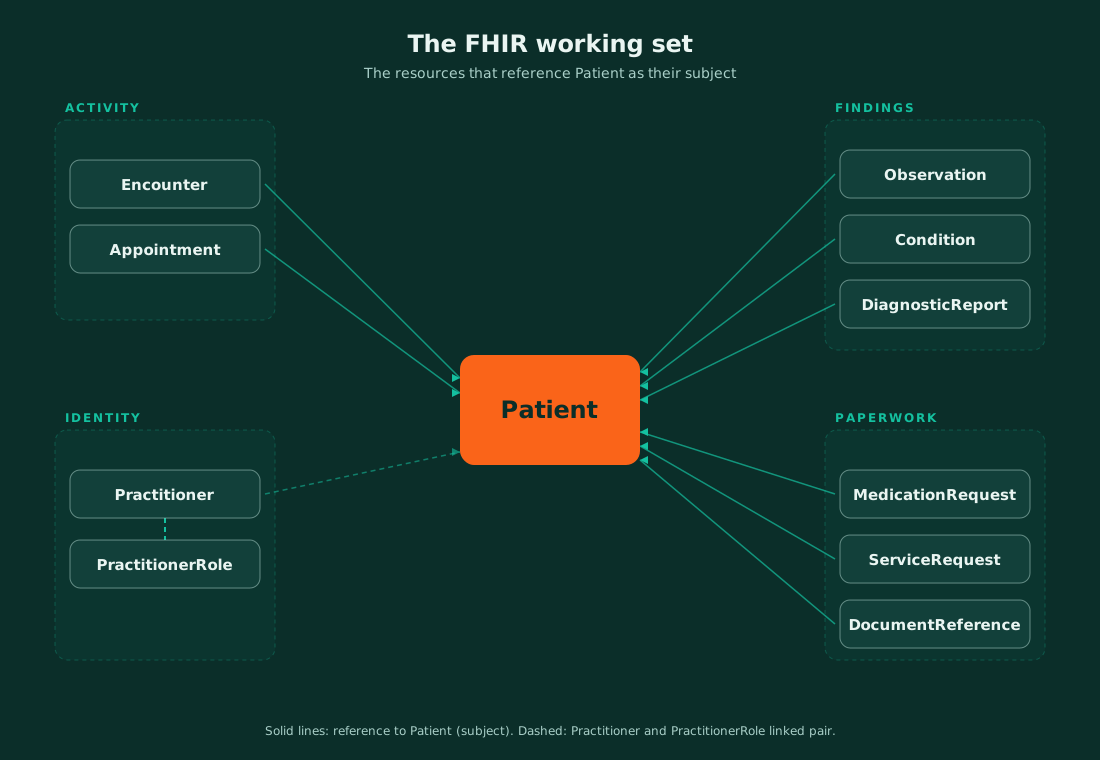
FHIR expresses healthcare data as resources: small, self-contained records with defined structures, linked to each other by references. The specification defines well over a hundred types, but a working set of roughly a dozen carries most integrations, and it splits naturally into four groups: identity (Patient, Practitioner, Organization, Location), activity (Encounter, Appointment, ServiceRequest, MedicationRequest), findings (Observation, Condition, DiagnosticReport) and paperwork (DocumentReference, Bundle). The most common failures aren't structural; they're category errors, like recording diagnoses as Observations, and they're avoidable once the boundaries are clear.
How to read a FHIR resource
Four habits make every resource below easier to work with. First, every resource is mostly optional by design; the profiles you build against (UK Core in the NHS, US Core in the States) are what make elements mandatory. Second, resources point at each other through references, and a resource whose references don't resolve is a sentence with missing words. Third, coded content lives in a structure called CodeableConcept: a code, the system it comes from, and a human-readable display, which is where terminology governance meets the resource model. Fourth, status fields (an Encounter that's planned versus in-progress versus finished, an Observation that's preliminary versus final) carry real clinical meaning and are the elements downstream logic most often ignores.
The identity set: Patient, Practitioner, Organization, Location
Every resource in this group answers a "who" or "where" question that the rest of the working set points back to.
- Patient the anchor: it holds demographics and, crucially, identifiers. In a UK context the NHS number sits here in a defined identifier slot, and almost every other resource in the working set points back to a Patient.
- Practitioner identifies a person by their professional identity, independent of any specific role.
- PractitionerRole captures that same person acting in a role. Dr Rahman as a human is a Practitioner, while Dr Rahman as a cardiology consultant at a specific organisation is a PractitionerRole.
- Organization supplies the institutional context, such as the Trust, the practice, or the department.
- Location pins down the physical context, such as the ward, the consulting room, or the site.
The boundary that matters: Practitioner and PractitionerRole are easily flattened into one, and systems that do it spend years untangling clinicians who work across sites.
The activity set: Encounter, Appointment, ServiceRequest, MedicationRequest
This group is about intent and activity, distinct from what was found, which belongs to the next group.
- Encounter marks an episode of interaction, such as an admission, an outpatient appointment, or an A&E attendance. It has a class (inpatient, ambulatory, emergency), a status lifecycle, and start and end times, and it's the resource that gives clinical events their "when and in what context".
- Appointment reserves a practitioner, location and time ahead of the visit actually happening, sitting just before the Encounter in time. It carries its own status lifecycle (proposed, booked, arrived, fulfilled, cancelled, noshow), separate from the Encounter's.
- ServiceRequest carries the ask, such as a lab order, an imaging request, or a referral.
- MedicationRequest records the prescription: what was ordered, for whom, by whom, and with what instructions.
The boundary that matters: Appointment and Encounter are easy to conflate. An Appointment can be booked and cancelled without any Encounter ever existing, and a walk-in Encounter can happen with no Appointment behind it at all.
The findings set: Observation, Condition, DiagnosticReport
This group is about what was found, not what was requested or done.
- Observation does the heavy lifting: a measurement or simple assertion at a point in time, such as a blood pressure reading, a potassium level, or a smoking status. It carries a coded "what" and a value, and it can hold components for multi-part results.
- Condition works differently: it represents a clinical state with duration and management, such as a diagnosis or a problem-list entry.
- DiagnosticReport acts as the grouping layer: the pathology or radiology report that packages a set of Observations with a conclusion, mirroring how results actually arrive from a lab.
The boundary that matters: Observation versus Condition is the single most common modelling error in FHIR work. A fasting glucose result is an Observation; the diabetes it contributes to diagnosing is a Condition.
The paperwork set: DocumentReference and Bundle
This group is about how document-shaped and resource-shaped data travel.
- DocumentReference points to a document, such as a discharge summary PDF, a clinic letter, or a scanned form, carrying metadata about what it is and where it lives.
- Bundle acts as the container: a set of resources travelling together as search results, as an atomic transaction, or as a message representing one event with everything it touches. If you've come from HL7 v2, a message Bundle is the nearest cousin to a classic v2 message.
Where teams misuse resources
Six patterns account for most of the pain, and all are boundary errors rather than syntax errors. Diagnoses recorded as Observations (or results as Conditions), which corrupts problem lists and analytics alike. Practitioner and PractitionerRole flattened into one, which breaks the moment a clinician works two roles. Codes sent without their system, which turns a CodeableConcept into an ambiguous string. Status fields defaulted and ignored, so preliminary results are treated as final. Appointment and Encounter merged into a single resource, usually because a scheduling system and a clinical system were integrated as if they recorded the same event, which breaks the moment a booking is cancelled that should never have touched a clinical record at all. And references to resources that were never sent, leaving receivers with orphaned pointers. None of these fail validation against base FHIR, which is exactly why profiles and terminology binding, covered in the UK Core piece on this blog, exist. This working set is also the level at which platforms operate day to day; producing, consuming and reshaping these resources inside workflows is the bread and butter WeHub Studio and Term were built for.
The bottom line
Don't learn a hundred resources; learn these well, and learn the boundaries between them better. The set above covers the overwhelming majority of real integration traffic, and the discipline that matters most is category: findings versus conditions, people versus roles, activity versus paperwork. A concrete first step: take your current integration's payloads and label every piece of clinical content with which resource it should be. The mislabels you find are cheaper to fix now than after they've spent a year in a shared record.